
What is Simulator Training for Pilots? A Beginner’s Guide
Simulator training for pilots is instructor-led practice in a ground-based device that recreates an aircraft’s instruments, controls, systems, and flying environment. It allows student and professional pilots to practise flight procedures, instrument handling, emergency situations, and crew coordination under instructor supervision, without operating an actual aircraft.
Here's what you need to know about simulator training.
- Four Main Simulator Categories – Cockpit Procedures Trainers, Flight and Navigation Procedures Trainers, Flight Training Devices, and Full Flight Simulators.
- Skills Developed – Instrument flying, navigation, cockpit procedures, decision-making, emergency handling, and crew coordination.
- Training Applications – Used during initial pilot training, instrument practice, aircraft type ratings, and airline recurrent training.
- FSTC Simulator Training – Includes 20 simulator hours in its CPL programme and 64 hours in its published A320 and B737 type-rating programmes.
- Simulator Training Costs – IGRUA's published reference rates range from ₹9,000 to ₹12,000 per hour, excluding 18% GST. FSTC's standalone hourly simulator fees are available on enquiry.
- DGCA Training Credit – Approved simulator sessions can count towards specific training requirements, subject to the applicable device approval and training programme.
- Simulator vs Actual Flying – Simulator practice develops procedures and decision-making skills but does not automatically replace required aircraft flying hours.
Simulator training is used throughout a pilot's career, from learning basic cockpit procedures to practising aircraft emergencies and airline operations.
How does a Flight Simulator Work?
Flight simulator workflow from pilot inputs to instruments and visuals
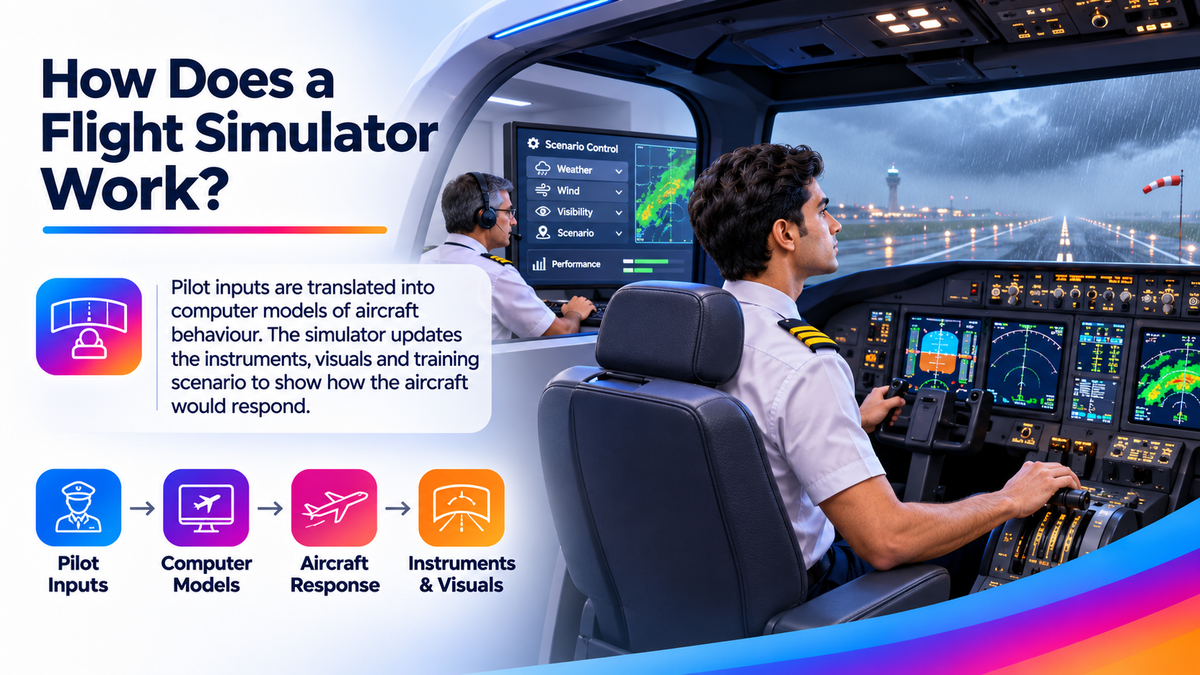
A flight simulator works by recreating how an aircraft responds to a pilot’s actions. When a pilot moves the control column, adjusts the throttle, or changes a cockpit setting, the simulator uses computer-based models to calculate how the aircraft would behave. These changes are reflected in the flight instruments and visual displays, allowing pilots to experience how their actions affect the aircraft.
Depending on the type of simulator, the training environment may include realistic cockpit controls, aircraft instruments, airport and runway visuals, weather conditions, sound effects, and motion systems. An instructor can control the training environment, introduce different scenarios, and monitor the pilot’s performance throughout the session.
For example, an instructor may simulate poor visibility, strong winds, or an engine failure to help pilots practise handling challenging situations safely. The ALSIM AL250 simulator demonstrates how cockpit instruments, visual systems and instructor controls work together to support flight training.
Not all flight simulators have motion platforms or fully replicated aircraft cockpits. Their features vary depending on the equipment and its intended training purpose.
What Types of Simulators do Pilots Use?
Pilots use different types of flight simulators depending on their training stage, experience, and learning objectives. Some simulators are designed to help beginners understand cockpit controls and basic flight procedures, while others provide advanced, aircraft-specific training for commercial and airline pilots. Each simulator offers different levels of realism, functionality, and training capabilities.
The table below outlines four commonly encountered training devices and their uses.
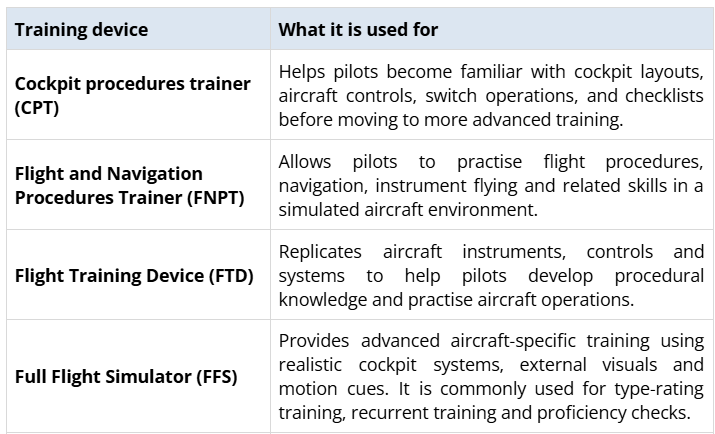
The European Union Aviation Safety Agency (EASA) simulator specifications explain the technical distinctions between these training devices.
In India, the use of simulators for approved pilot training and the credit granted for simulator hours depend on the applicable Directorate General of Civil Aviation (DGCA) regulations. Therefore, pilots should confirm that the simulator and training programme meet the requirements of their intended licence or rating.
Which Simulator is Best for a Beginner?
Best simulator for beginner pilots
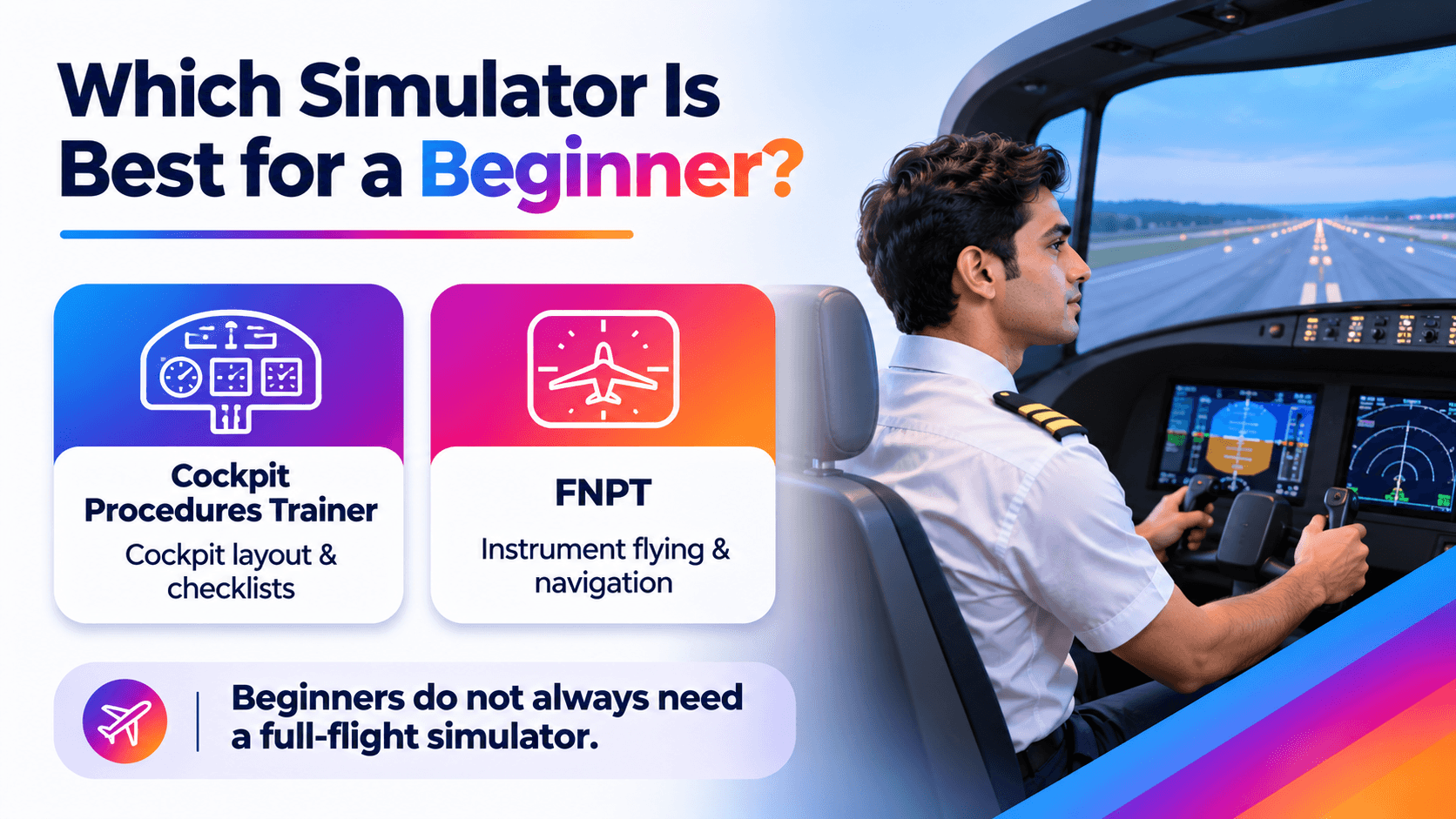
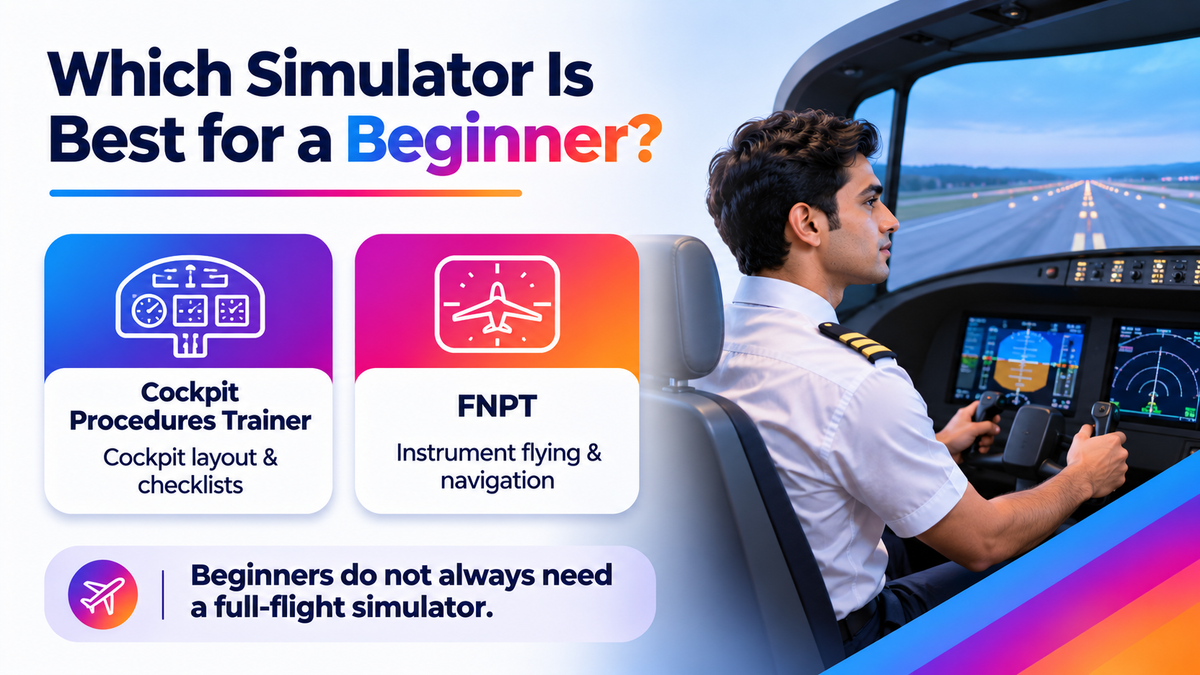
A cockpit procedures trainer or a Flight and Navigation Procedures Trainer (FNPT) can be a suitable starting point for beginners. These devices help aspiring pilots become familiar with aircraft instruments, cockpit controls, checklists, and basic flight procedures before progressing to more advanced training.
The right simulator depends on the pilot’s experience, training objectives, and licensing requirements. A beginner does not necessarily need a Full Flight Simulator (FFS), as simpler training devices may be sufficient for developing foundational skills.
Advanced simulators, particularly Level D Full Flight Simulators, are generally used for aircraft-specific training, including airline type ratings and proficiency checks. Level D refers to the simulator’s qualification standard, not the pilot’s skill level. Training in a Level D simulator also does not automatically mean that all completed hours will count towards a pilot licence. Any training credit must meet the applicable regulatory requirements.
Why is Simulator Training Useful for Pilots?
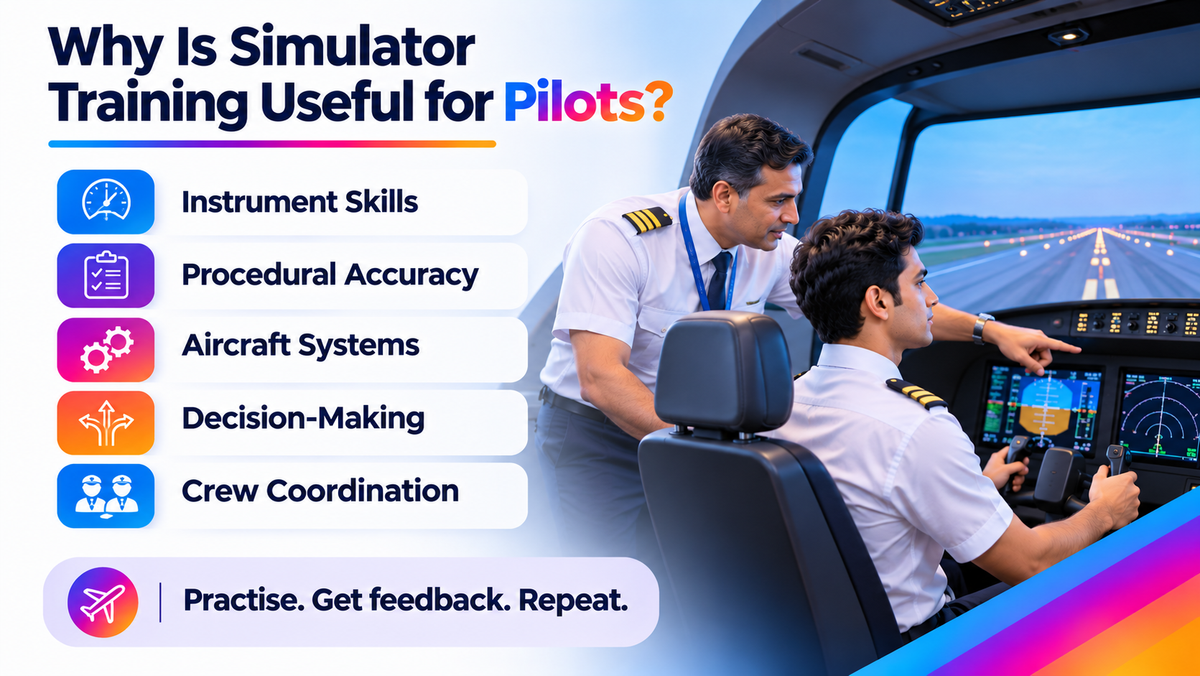
Why simulator training is useful for pilots
Simulator training gives pilots an opportunity to practise important flying skills in a controlled environment. Instructors can introduce specific situations, observe how pilots respond, provide feedback, and repeat exercises until the required skills improve. This makes it easier to understand mistakes and develop the confidence to handle different flying conditions.
Depending on the training syllabus, simulator sessions help pilots develop several essential skills, including:
- Instrument Skills: Reading flight instruments accurately and maintaining situational awareness when outside visual references are limited.
- Procedural Accuracy: Following checklists and standard operating procedures in the correct sequence.
- Aircraft-System Understanding: Understanding how different aircraft systems work and recognising the meaning of warnings and instrument indications.
- Decision-Making: Assessing situations, prioritising tasks and selecting appropriate responses during challenging conditions.
- Crew Coordination: Communicating effectively, sharing responsibilities and monitoring another pilot’s actions during a flight.
One of the biggest advantages of simulator training is the ability to practise emergency scenarios without exposing an actual aircraft or its occupants to unnecessary risks. Pilots can examine their decisions, understand the appropriate responses, and improve their ability to manage similar situations. Airbus's guidance on pilot resilience training also highlights the importance of developing pilot competencies through scenarios suited to their experience.
Simulator training is also less dependent on outdoor flying conditions, making it easier to schedule focused practice sessions. However, equipment maintenance, instructor availability, and training schedules can still affect access.
What happens during your First Simulator Session?
A first flight simulator session typically includes three stages: a briefing, practical exercises, and a debriefing. Each stage serves a specific purpose, helping beginners understand the exercise, practise the required skills, and identify areas for improvement. The instructor guides the session and explains what is expected at each stage.
Simulator Session Briefing
The session begins with a briefing in which the instructor explains the training objectives, relevant procedures, simulator limitations, and safety instructions. Initial exercises may focus on understanding the cockpit layout, interpreting flight instruments, or following basic checklists.
Beginners should clarify anything they find unfamiliar. Understanding the purpose of a procedure is more useful than copying a sequence without knowing why it matters.
Guided Simulator Practice
During the practical session, the instructor observes how you perform the assigned tasks and provides guidance where needed. Training exercises may include pauses, explanations, and opportunities to repeat a task until you become more comfortable with it. Formal assessments, however, may follow different procedures.
Imagine your aircraft's simulated altitude begins to drift while you are concentrating on completing a checklist. The instructor may ask you to repeat the exercise, helping you develop a better instrument-scanning routine and manage multiple tasks more effectively. This is an illustrative example; the actual exercises depend on your course syllabus and training objectives.
Simulator Debriefing and Feedback
The session concludes with a debriefing in which the instructor reviews your performance, identifies what went well, what needs work, why an error occurred, and how it can be avoided in future exercises.
Simulator Training vs Real Aircraft Training: What is the Difference?
Simulator training and real aircraft training are both important parts of pilot development, but they offer different learning experiences. A simulator provides a controlled environment where pilots can repeat exercises, practise selected emergency scenarios, and improve their understanding of aircraft systems. Real aircraft training, on the other hand, allows pilots to experience actual flight conditions, aircraft movement, and the practical demands of operating an aircraft.
The key differences between the two are outlined below:
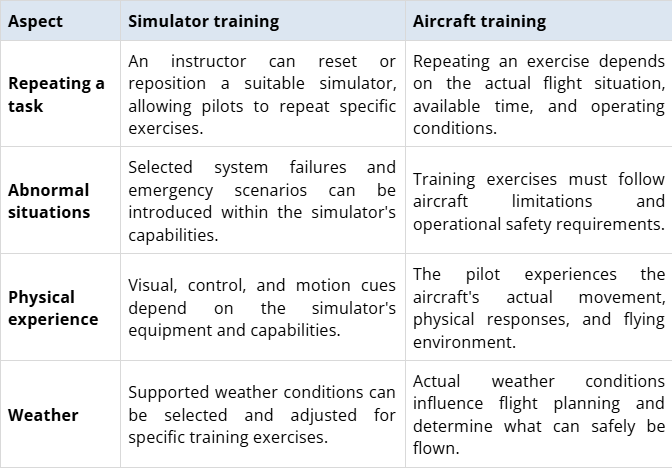
Despite their advanced capabilities, flight simulators cannot reproduce every aspect of operating a real aircraft. Their effectiveness depends on the device's approved capabilities and the training objectives. Practising beyond a simulator's validated capabilities may also lead to incorrect responses.
Ultimately, simulator training complements rather than replaces real aircraft experience. Both contribute to developing the technical skills, procedural knowledge and practical judgement required of a competent pilot.
When do Pilots use Simulators during Training?
Simulator training plays an important role at different stages of a pilot's professional development. Students use simulators to practise basic instrument procedures during commercial pilot training, while experienced pilots rely on them for aircraft-specific training, recurrent practice and proficiency checks throughout their careers.
CPL and Instrument Simulator Training for Student Pilots
Students pursuing a Commercial Pilot Licence (CPL) can use simulators to practise instrument flying, understand cockpit procedures and become familiar with aircraft operations alongside ground school and actual flying lessons.
Theoretical knowledge also plays an important role at this stage. Understanding aircraft systems, navigation, meteorology and flight principles helps students apply what they learn during simulator exercises. Our DGCA CPL syllabus and study-plan guide explains the subjects covered during this training.
Aircraft-Specific Simulator Training During Type Rating
Type-rating training prepares pilots to operate a specific aircraft type, such as the Airbus A320 or Boeing 737. Simulator sessions at this stage focus on aircraft-specific operations, allowing pilots to practise normal procedures, system management and responses to abnormal situations.
The training programme typically combines ground instruction, simulator exercises and assessments to evaluate a pilot's readiness to operate the aircraft. The type-rating guide provides further information about the qualification, training duration, costs and course considerations.
Recurrent Flight Simulator Training for Airline Pilots
Simulator training continues throughout an airline pilot's career. Pilots regularly complete applicable recurrent training and proficiency checks to maintain their skills, refresh their knowledge and practise handling situations that may rarely occur during routine flights.
Multi-crew simulator exercises also strengthen communication, coordination and workload management. The pilot flying is responsible for managing the aircraft's flight path, while the pilot monitoring supports the operation by checking flight parameters, communicating, and carrying out assigned tasks. Our article on aviation English and safe flying explains why clear communication is essential for safe flight operations.
Is Simulator Training Compulsory, and do Simulator Hours Count in India?
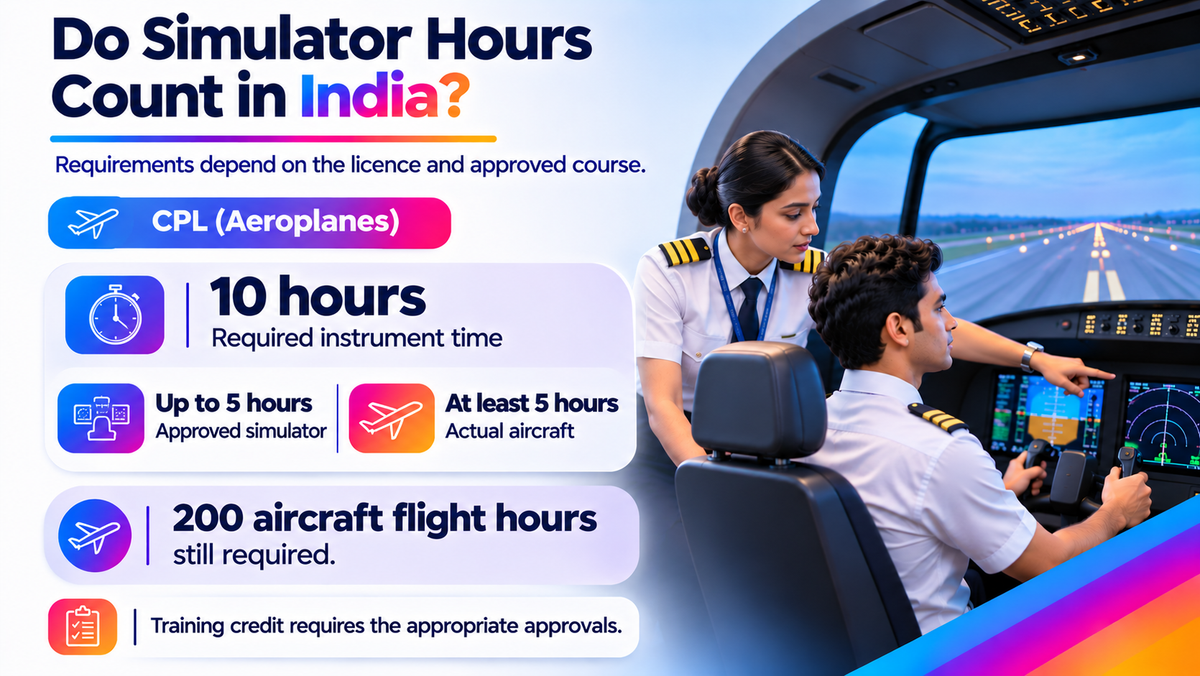
CPL simulator hours in India: 10 instrument hours, up to 5 in a simulator
Simulator training requirements in India depend on the pilot licence, rating, approved training programme and type of exercise involved. Although simulators form part of several professional pilot training programmes, beginners are not required to purchase a separate simulator package before starting their flying training.
DGCA permits a maximum of 5 simulator hours towards the required 10 hours of instrument time for a CPL (Aeroplanes). The overall requirement of 200 hours of flight time remains applicable. This means at least 5 hours of the required instrument time must be completed in an aircraft.
The Directorate General of Civil Aviation (DGCA), under its simulator qualification Civil Aviation Requirements (CAR), Section 7, Series D, Part VI, distinguishes between the qualification of a simulator device and its approval for use in a particular training programme. An Approved Training Organisation (ATO) must also have the device included within its approved training scope.
Before enrolling in a simulator programme, ask the training provider which regulatory requirement the sessions fulfil, whether the device is approved for that purpose, how many hours can be credited, and what training records will be provided. It is equally important to distinguish simulator hours from actual aircraft flying hours.
Completing a simulator course independently does not grant a pilot licence or guarantee airline employment. Simulator training is one part of the broader qualification and experience required to become a professional pilot.
How many Simulator Hours does a Beginner Need?
There is no single number of simulator hours that every beginner must complete. The training requirement depends on the pilot licence, rating, approved training syllabus, and the student's experience. However, the Directorate General of Civil Aviation (DGCA) specifies how many simulator hours may be counted towards certain licensing requirements in India.
Under the Indian Aircraft Rules, 1937, the following simulator-hour provisions apply:

These requirements mean that a CPL applicant can complete up to 5 of the required 10 instrument hours on an approved simulator. Similarly, an applicant pursuing an Instrument Rating (Aeroplanes) can complete up to 20 of the required 50 instrument hours on an approved simulator. The remaining instrument time must meet the applicable actual-flight requirements.
It is important to understand that these figures represent the maximum simulator hours permitted towards the respective licensing requirements and not the minimum number of simulator sessions every beginner must attend.
Individual flying schools may include additional simulator practice in their CPL programmes to develop cockpit familiarity, instrument interpretation and procedural skills. For example, our CPL + Multi-Engine + Instrument Rating (ME+IR) programme includes 20 hours of simulator training, comprising 10 hours on a single-engine simulator and 10 hours on a multi-engine simulator.
Before enrolling, check the approved training syllabus, the number of simulator sessions included in the course, the duration of each session, and whether additional practice involves extra charges. Also confirm that the simulator is approved for the intended training purpose so that eligible hours can be properly credited towards the relevant qualification.
How much does Simulator Training Cost in India?
Simulator training fees in India vary depending on the type of simulator, aircraft model, training objectives, instructor support, and duration of the course. Students may pay an hourly fee for individual simulator sessions or receive simulator training as part of an integrated CPL or type-rating programme.
A useful pricing reference is the Indira Gandhi Rashtriya Uran Akademi (IGRUA), which publishes the following hourly simulator rates:
Simulator Published rate per hour
Diamond DA40 simulator ₹9,000
Diamond DA42 simulator ₹12,000
These rates are listed on IGRUA's official approved courses and fee page. The academy states that applicable GST of 18% is charged separately.
Simulator Training Fees and Facilities at FSTC
FSTC includes simulator training within its integrated Commercial Pilot Licence (CPL + ME + IR) programme. Its published course structure includes 20 hours of simulator training, divided into 10 hours on a single-engine simulator and 10 hours on a multi-engine simulator. The integrated programme also includes 200 hours of aircraft training, and its course price is ₹67.35 lakh.
We also operate advanced Full Flight Simulators (FFS) for aircraft-specific training and airline type ratings. Our simulator fleet includes:
Simulator Type Aircraft Model
Airbus A320 CEO and A320 NEO
Boeing B737 NG and B737 MAX
Turboprop Bombardier Dash 8 Q400
Turboprop ATR 72-600
These facilities are located across FSTC's Gurugram and Hyderabad training centres. The A320 NEO simulators are identified as Level D Full Flight Simulators.
Before enrolling, confirm whether the quotation includes instructor fees, briefing and debriefing sessions, applicable taxes, assessments, and additional simulator practice. Also check whether simulator training is already included in the overall course fee to avoid paying twice for the same training component.
What should a Simulator Training Quotation Include?
A simulator training quotation should clearly explain what you are paying for and which services are included. Ask for an itemised breakdown covering the simulator used, training time, instructor fees, briefing and debriefing, applicable taxes, assessments, and charges for additional sessions. The quotation should also specify whether the price is per trainee or per simulator session, as this affects how you compare costs.
Shared sessions require particular attention. During two-pilot training, confirm how time is divided between pilot-flying and pilot-monitoring duties. Both roles provide valuable practice, but they involve different responsibilities. A four-hour shared session does not automatically give each trainee four hours of hands-on flying practice. Understanding this allocation helps you assess what the quoted training time actually includes.
Effective simulator practice may reduce avoidable repetition, but it does not guarantee a fixed saving on your overall pilot-training budget. Compare quotations based on the training provided and the full cost of completing it, rather than the advertised hourly rate alone.
How should you choose and prepare for a Simulator Course?
Choosing a simulator course starts with understanding the skill you want to develop or the qualification you are working towards. The course should match your training objectives, and the simulator should be suitable for the exercises involved. Before booking, ask the training provider these questions.
- Which aircraft and training objectives does the session cover? Confirm what you will practise and how it supports your learning goals.
- Is the simulator suitable and approved for the training credit I need? Clarify whether the sessions can count towards your intended licence or rating.
- Who will teach the session, and what preparation is expected? Ask which materials and procedures you should review beforehand.
- How will my progress be assessed and feedback recorded? Understand how the instructor will identify improvements and explain what needs further practice.
- Which costs are excluded from the quotation? Check the charges for additional practice and repeat sessions before committing.
Once your session is booked, review the assigned materials, write down any questions, and arrive well rested. Follow your instructor’s preparation guidance rather than learning unfamiliar emergency procedures from videos about unrelated aircraft.
After the lesson, keep a short record of the feedback you received and the next task to practise. This gives your preparation for the following session a clear focus.
Simulator Training at FSTC for CPL and Aircraft Type Ratings
FSTC incorporates simulator training into both its Commercial Pilot Licence (CPL) and aircraft-specific type-rating programmes. Its CPL programme includes simulator sessions alongside aircraft flying, helping students connect procedural practice with their flying lessons.
The type-rating programme combines ground instruction, fixed-base and full-flight simulator sessions, and line-oriented flight training. These scenario-based exercises allow pilots to apply aircraft-specific procedures in situations representative of operational flying.
FSTC lists Level D simulator facilities in Gurugram and Hyderabad, with equipment representing Airbus A320, Boeing 737, ATR, and Q400 aircraft. The appropriate course and training location depend on your stage of training and the aircraft you intend to operate.
Your enquiry should begin with a clear objective, whether that is developing a particular skill or working towards a qualification. Contact FSTC’s training team with your experience and goals, and request the relevant syllabus, eligibility requirements, and an itemised fee quotation. Confirm which simulator sessions are included, what training credit applies, and whether additional practice carries a separate charge before enrolling.
Frequently Asked Questions
Do I Need a Pilot Licence to Try Simulator Training?
Introductory simulator sessions may be available without a pilot licence or previous flying experience, depending on the training provider’s access policies. These sessions are different from professional type-rating courses and proficiency checks, which have specific entry requirements. Explain your experience and learning goals when enquiring so the provider can confirm which sessions are suitable.
Can a Home Flight Simulator Help With Pilot Training?
A home flight simulator can support cockpit familiarisation and instructor-directed practice, but it does not automatically provide approved training credit. Ask your instructor which exercises are appropriate and how the software and controls differ from your training aircraft. This helps keep your practice relevant to the procedures you are learning.
Is It Possible to Fail a Simulator Session?
An unsuccessful result in a formal simulator assessment may mean you need additional training or another assessment to demonstrate the required standard. Practice sessions, however, focus on helping you develop skills, understand mistakes, and improve through instructor feedback.